Press the DISP button on the 645D camera and an Electronic Level Display appears on the rear monitor. It measures the degree of tilt both horizontally and vertically. Green means you’re level on a particular axis, then yellow bars show the level of tilt until you hit red.
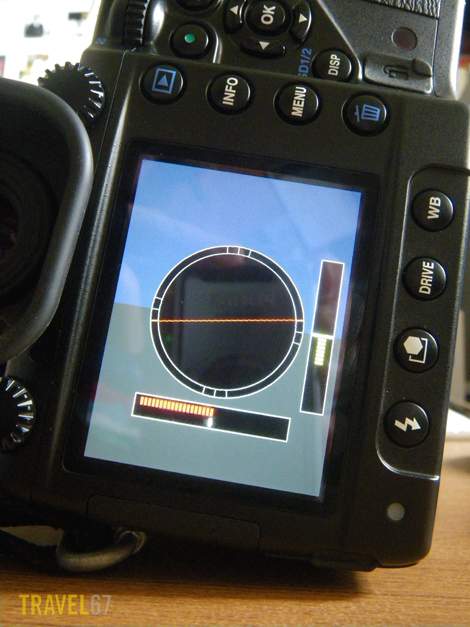
Pentax 645D Electronic Level Display
In the shot above you can see that the camera is angled approximately 3.5 degrees down on the vertical axis (7 yellow bars), and off the scale on the horizontal axis (red).
Why is this a great thing to have? If you’d wanted the camera perfectly level when you took the photograph but found you had it angled, you will have to rotate and crop the image. Depending on the degree of tilt, this cropping will result in you having a smaller image to work with, or even losing part of the image.
I use a ball head (rather than a pan head) with my tripod which means I will be using this feature a lot when shooting landscapes or cityscapes. I’m not saying all photographs should be taken perfectly level, but if you’re trying to keep things from going askew, the E.L.D. makes it a little easier.
 TRAVEL 67 : Chris Willson Photography
Same software feature in the K-7 and the K-5! Just great!